
Supporters App
The closest thing to being there
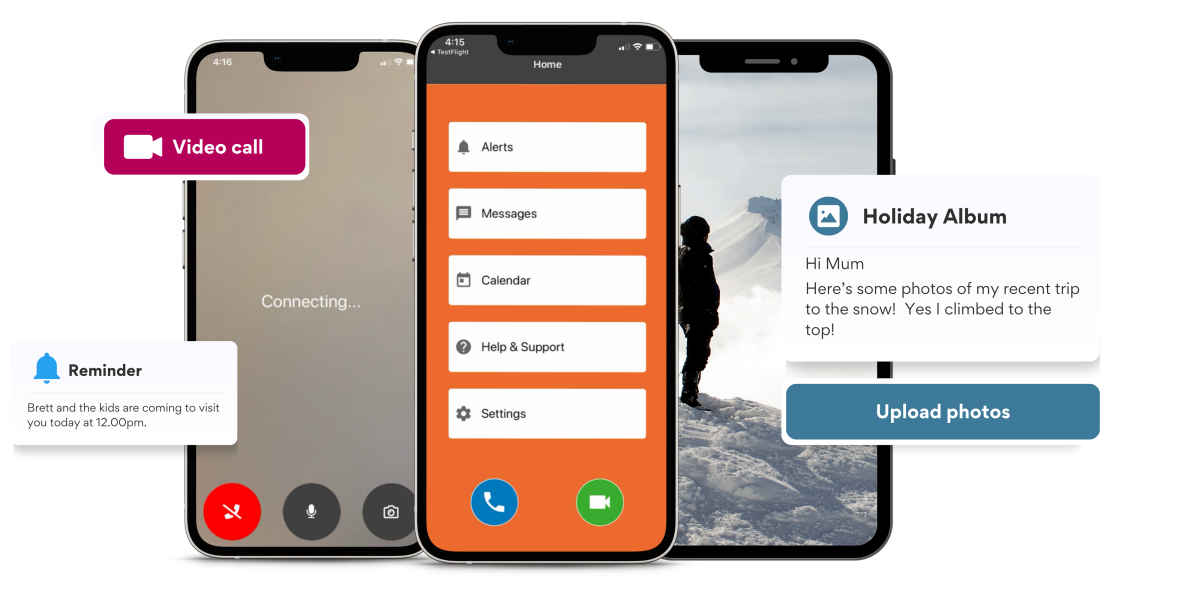
A free app for family and friends. Stay connected to your loved one's Lumin CareHub screen - with shared memories, scheduled reminders, updates, alerts, and easy video calling. Genuine peace of mind, even from a distance.

How to get started
Get invited
Your loved one invites you from their CareHub screen - or the Lumin support team sends an invitation on their behalf.
Download the app
Follow the invitation link to download the free Supporters App on your iPhone or Android phone.
You're connected
Start calling, sharing photos, sending messages, and setting reminders - directly to their CareHub screen.
What you can do
Your direct line to their CareHub
Stay in touch
Call or video call the CareHub screen directly - with auto-answer so the call always connects. Send messages with optional one-touch replies.
Share memories
Send photos directly to your loved one's CareHub screen - brightening their day with family moments.
Scheduled reminders
Set reminders for appointments, medications, and important dates - gently keeping them on track. Get notified if a reminder is missed.
Updates, alerts & visibility
Receive notifications about wellness, daily activity, and important events. Stay informed about services being provided - with transparency that builds trust.
Direct support
Contact the Lumin support team directly on behalf of your loved one - for help, questions, or to request changes.
Remote settings
Manage contacts, adjust preferences, and configure certain CareHub settings remotely - keeping things up to date from wherever you are.
The Lumin Platform
Supporters App is part of a connected ecosystem
Every part of the Lumin platform works together - giving users connection, families reassurance, operators visibility, and care teams coordination.
CareHub
Managed touchscreen for older adults - video calls, entertainment, safety alerts and the OneTouch interface
Explore →Lumin App
Community connection and village services on a user's own device
Explore →Community Portal
Operator dashboard for communications, events, and maintenance
Explore →Lumin Connect
Integration layer connecting Lumin to the systems you already run
Explore →Lumin Cloud
Secure cloud infrastructure, data warehouse, and device management platform
Explore →Download the Supporters App
Ask your loved one or their Lumin support team to send you an invitation - then download the app and connect.